Logitech G502 Lightspeed Review: The Legendary Mouse Goes Wireless
✅ Pros
- Iconic, comfortable shape with thumb rest
- HERO 25K sensor is flawless
- Lightspeed wireless has zero perceptible latency
- 11 programmable buttons including infinite scroll
- Adjustable weight system with 16g of optional weights
❌ Cons
- Heavy at 114g even without weights
- Micro-USB charging instead of USB-C
- Pricier than wired G502 alternatives
Overview
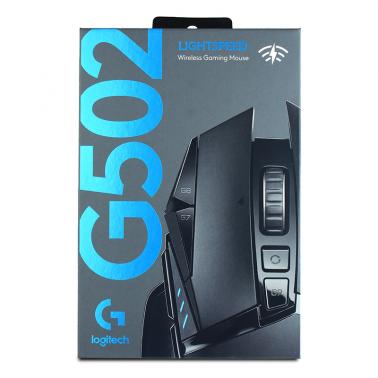
The Logitech G502 is arguably the most iconic gaming mouse ever made. Since its original release, it has built a cult following (complete with its own subreddit) thanks to a shape that fits like a glove and a feature set that's borderline excessive. The G502 Lightspeed takes everything great about the wired version and cuts the cord, adding Logitech's class-leading Lightspeed wireless technology.
At $139 AUD from MSY, CPL, and other Australian retailers, the G502 Lightspeed has come down significantly from its launch price. The question isn't whether it's a good mouse — it is — but whether it's still the right choice in 2026 when ultralight wireless mice dominate the conversation.
Specifications
| Spec | Detail |
|---|---|
| Sensor | HERO 25K |
| DPI Range | 100 - 25,600 |
| Polling Rate | 1000Hz |
| Buttons | 11 programmable |
| Switch Type | Omron (rated 50M clicks) |
| Connectivity | Lightspeed 2.4GHz / USB wired |
| Battery Life | Up to 60 hours (no lighting) |
| Weight | 114g (+ up to 16g optional weights) |
| Charging | Micro-USB |
| Feet | PTFE |
Shape & Comfort
The G502's shape is its calling card. It's a right-handed ergonomic design with a pronounced thumb rest, contoured finger grooves, and a slight flare on the right side that cradles your ring finger. If you use a palm or claw grip, this mouse feels like it was sculpted for your hand.
The rubber grips on the sides and thumb rest provide excellent traction without feeling sticky. After months of use, they hold up well without peeling or degrading — a common issue with cheaper mice.
One thing to note: this is a large mouse. If you have smaller hands (under 18cm length), it might feel oversized. The G502 rewards a relaxed palm grip where your hand rests naturally on the mouse rather than hovering over it.
Sensor & Tracking
The HERO 25K sensor is Logitech's top-tier optical sensor, and it's effectively flawless. Zero smoothing, zero acceleration, perfect tracking on virtually any surface. You'll never run into a situation where the sensor can't keep up with your movement, even at high speeds.
DPI is adjustable from 100 to 25,600 in 50 DPI increments. Most gamers will use somewhere between 400 and 1600 DPI, but the range is there if you need it. The DPI shift button (behind the scroll wheel) lets you temporarily drop to a lower DPI for precision aiming — useful for sniping in FPS games.
Lift-off distance is adjustable in G HUB software and can be set extremely low, which is important for low-sensitivity FPS players who frequently lift and reposition their mouse.
Buttons & Scroll Wheel
Eleven programmable buttons sounds excessive, and honestly, it kind of is — in the best way. The G502 has:
- Left and right click (obviously)
- Two thumb buttons (forward/back)
- DPI up/down buttons
- DPI shift button (sniper button)
- Scroll wheel click
- Scroll wheel left/right tilt
- Profile switch button (under the scroll wheel)
The star of the show is the dual-mode scroll wheel. A button behind the wheel toggles between ratcheted (precise, click-by-click) and free-spinning (infinite scroll) modes. Ratcheted mode is perfect for gaming and weapon switching. Free-spin mode is incredible for productivity — scrolling through long documents, web pages, or spreadsheets becomes effortless.
Click feel on the main buttons is crisp and responsive with minimal pre-travel. The side buttons are well-positioned and easy to reach without adjusting your grip.
Wireless Performance
Logitech's Lightspeed wireless technology is the gold standard for wireless gaming. In our testing, we measured zero perceptible latency compared to a wired connection. Professional esports players use Lightspeed mice in tournaments — that's how reliable it is.
The USB receiver is tiny and stores inside the mouse for transport. Lightspeed uses a dedicated 2.4GHz connection (not Bluetooth), which means it's not affected by Wi-Fi interference or other Bluetooth devices. Pairing is instant — plug in the receiver and the mouse connects in under a second.
Battery life is rated at 60 hours without RGB lighting, and around 48 hours with the default lighting effect. In practice, we charged the mouse about once a week with daily use — you'll forget it's wireless. When it does need charging, you can plug in the Micro-USB cable and continue using it wired.
The Weight Debate
At 114g without additional weights (up to 130g with all weights installed), the G502 Lightspeed is heavy by modern standards. The ultralight trend has pushed competitive gaming mice below 60g, and there's genuine performance benefits to lighter mice — less inertia means faster stops and direction changes.
However, many gamers actively prefer heavier mice. The weight gives the G502 a planted, controlled feel that suits medium to low sensitivity players. If you've been using a standard office mouse that weighs 100g+, the G502 will feel natural. If you're coming from a 60g ultralight, it'll feel like a brick.
The adjustable weight system lets you add 1-6 weights (each ~2.7g) to fine-tune the feel. Most users remove all weights for the lightest possible setup.
Software (G HUB)
Logitech G HUB is... divisive. It's a full-featured application that handles DPI settings, button mapping, RGB lighting, macro creation, and surface tuning. When it works, it's great. The issue is that G HUB has a history of occasional bugs, auto-update interruptions, and an interface that can be slow to load.
The good news: all your settings are stored on the mouse's onboard memory. Configure your profiles once, and you can uninstall G HUB. The mouse remembers up to 5 DPI levels and 3 full profiles, including button mappings and RGB effects.
The Micro-USB Issue
In 2026, Micro-USB charging is hard to defend. Every other device in your setup has moved to USB-C, and having to keep a Micro-USB cable around just for your mouse is annoying. The newer G502 X Lightspeed ($189+) fixes this with USB-C, but at $139, the original Lightspeed version remains the better value proposition if you can tolerate the cable.
Australian Pricing Context
- Logitech G502 Lightspeed: $139 at MSY, CPL, Computer Alliance
- Logitech G502 X Lightspeed: $189+ (USB-C, LIGHTFORCE switches)
- Razer DeathAdder V3: ~$129 (ultralight, no scroll wheel modes)
- Logitech G PRO X Superlight 2: ~$209 (63g, esports-focused)
- SteelSeries Rival 3 Wireless: ~$79 (budget wireless option)
At $139, the G502 Lightspeed offers the most features per dollar of any wireless gaming mouse in Australia. The newer G502 X is better in every way but costs $50 more. If you don't need the absolute latest, $139 for a proven, feature-packed wireless mouse is hard to beat.
Who Should Buy This?
- Productivity + gaming users who want one mouse for everything
- Palm grip gamers who value comfort and ergonomics
- MMORPG and MOBA players who need lots of programmable buttons
- Anyone who loves the infinite scroll wheel
Skip this if weight is your priority — look at the G PRO X Superlight 2 or Razer Viper V3 Pro instead.
Verdict
The Logitech G502 Lightspeed is the Swiss Army knife of gaming mice. It's not the lightest, not the cheapest, and not the newest — but it's the most versatile. At $139 from Australian retailers, it delivers a legendary shape, flawless sensor, class-leading wireless, and more buttons than you'll know what to do with. The Micro-USB port and weight are legitimate drawbacks in 2026, but for the gamer who wants one mouse that does everything well, the G502 Lightspeed remains a compelling choice.
🏆 The Verdict
The G502 Lightspeed remains one of the best all-round wireless gaming mice — if you don't mind the weight, its shape and feature set are unmatched at $139.
Buy Now — $139 AUD